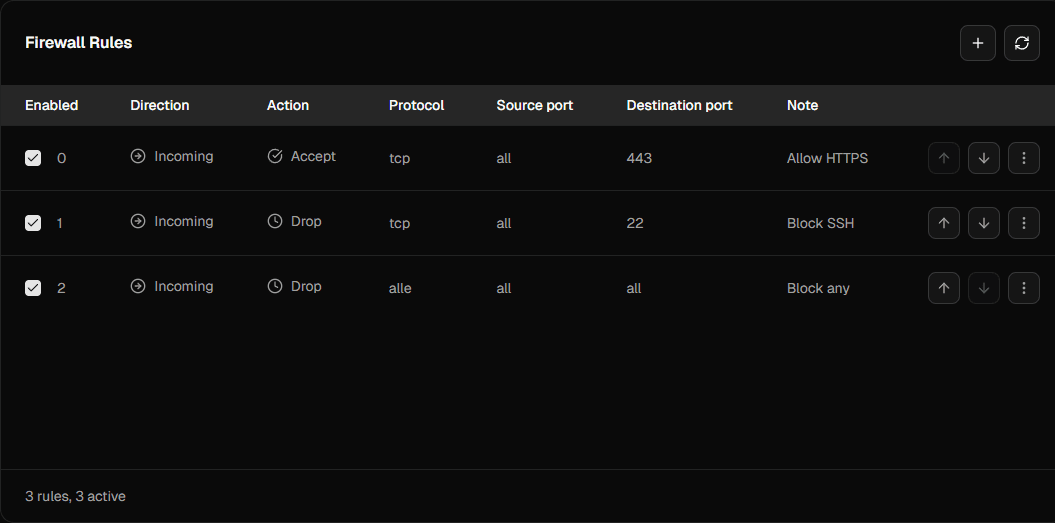
With Virtbase's stateless firewall, you can further secure your server. You can use your own rules to filter incoming and outgoing requests to and from your server.
The options Accept, Drop, and Reject are available.
By default, all incoming and outgoing connections are set to Accept. You should adjust this to suit your individual needs.
How do I create firewall rules?
To create a new firewall rule, proceed as follows:
- Open your server in the customer portal.
- Click on Firewall in the navigation bar.
- You will now see an overview of your existing firewall rules. Click on + in the top right-hand corner.
- Here you can define the properties of your rule.
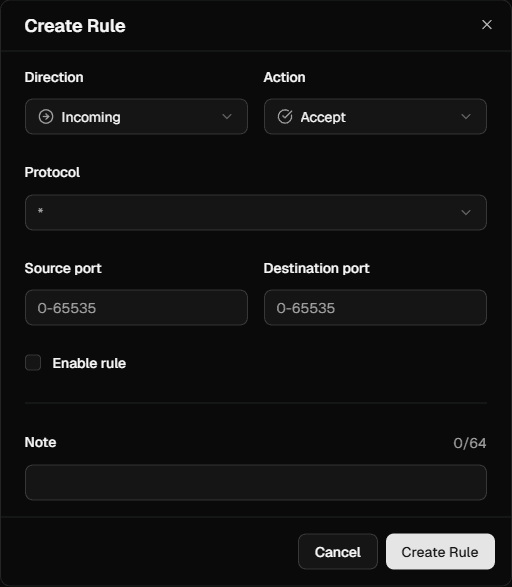
- Ensure that the rule is active. It may take a few seconds for the rule to be applied to new requests.
If you have any further questions about the firewall or need assistance, please contact our support team.
What do the processing options mean?
Accept: The request passes through the firewall. A request that meets the properties of the rule is allowed and can reach or leave your server.
Drop: The firewall passively blocks the request. No response is sent, or the request times out.
Reject: The firewall actively blocks the request. A “connection refused” response is sent.
We always recommend using the Drop mode for blocking. Otherwise, a potential attacker can identify that the blocked port is being used on your server. This allows conclusions to be drawn about the services being used.
With the Drop method, it is not possible to guess which ports are in use.
In what order are the rules processed?
Active firewall rules are processed from top to bottom. As soon as a rule applies to the request, it is applied and further processing is stopped.
Inactive firewall rules have no effect on requests. They are ignored during processing.
Therefore, the order of the rules must be observed. We recommend the following order:
- Start with specific DENY rules first.
- Then define specific ALLOW rules.
- Place general DENY rules at the end.
The following image shows this structure for incoming rules: