It often happens that requirements change and you need a different operating system on your server. You can change your server's operating system in just a few clicks and within seconds in the customer portal.
How do I start the reinstallation?
Follow these steps to reset your server:
When reinstalling the operating system, all data will be irrevocably deleted. We recommend first creating a backup of the current configuration.
- Open your server in the customer portal.
- Click on Overview in the navigation bar.
- On the left-hand side, click on Change operating system.
- Here you can select your new operating system and set a new root password. Your root password will not be saved and cannot be displayed again, so make sure you remember it.
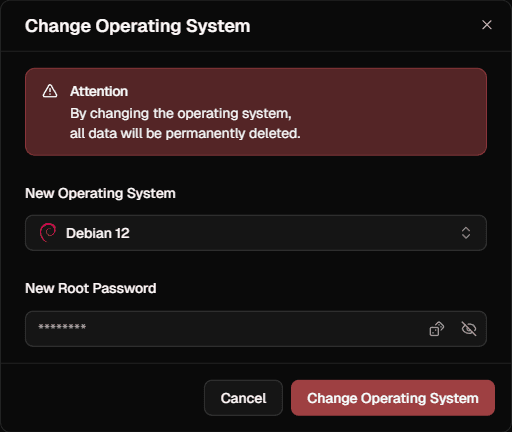
- Confirm the reset to start the process.
Your server will then be stopped and the operating system will be changed.
If you have any further questions about our operating systems or need assistance, please contact our support team.
How can I upload my own ISO files?
You can upload and integrate up to three of your own ISO files for your servers in the customer portal. You can find these in your Account Settings.